
Sell the tickets for your events from your own website
Concerts, tastings, workshops or talks: free or paid tickets, with a capacity and a QR code for the door. The money goes straight to your account.
Free during the 14-day trial · Then €19 a month per website
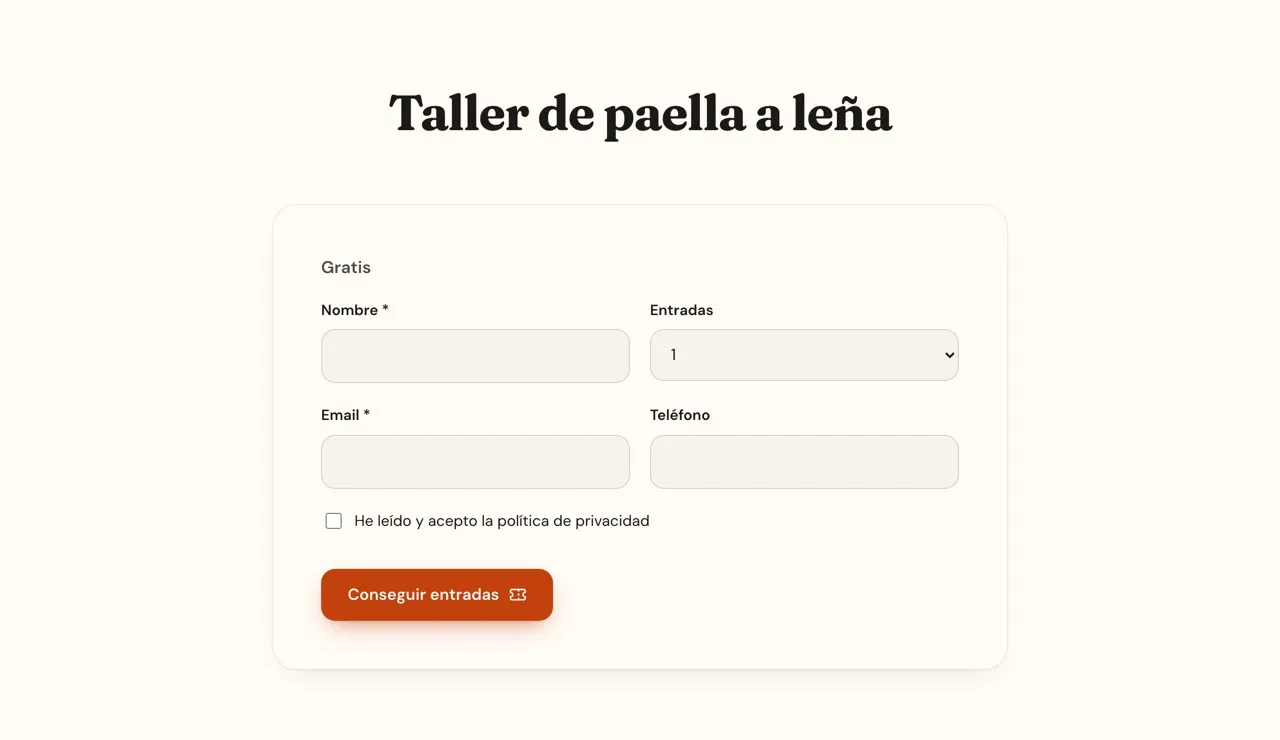
Your first event on sale today
-
Turn it on
From Tickets, in the panel. It is free during the trial; with a plan it is added to your subscription.
-
Connect how you get paid
Your Stripe account (card, Apple Pay and Google Pay) or your bank's virtual POS through Redsys, with Bizum if your bank offers it. Free tickets need nothing.
-
Put tickets on your events
Price, capacity, maximum per person and until when they are sold. The page of each event sells them by itself.
-
Welcome your audience
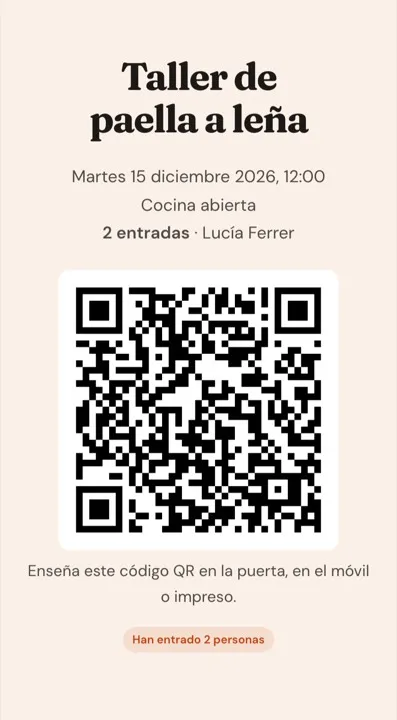
Each person gets their tickets by email with a QR code. At the door you scan it with your phone and see who is in.
What an event needs, without another ticketing platform
With your design, on your domain, and without sending your audience to another website.
-
Free or paid
Free tickets for a talk or paid ones for a concert, with a price per ticket.
-
Capacity
Set the places and sales close by themselves when it is full: nobody gets more tickets than there are left.
-
Your rules
How many tickets each person may get and until when they are sold. And pause sales whenever you like.
-
Your account, your money
You get paid through your own Stripe account or your bank's POS: the money goes straight to you.
-
QR at the door
Every order comes with a QR code. Scan it with your phone and let the people of that order in, even if they arrive separately.
-
Guest list
Who has tickets, how many, how much you have taken and who is already in, with a CSV download.
-
Cancellations and refunds
Cancel an order from the panel and, if it was paid, it is refunded through Stripe or Redsys and the person is told.
-
Anywhere on your website
The page of each event sells its tickets, and the Tickets block sells them on your home page or any other page.
-
Every guest, a contact
Tickets stay on each person's contact card, and an automation can write to them when they get tickets.
A ticket with a QR code, on the phone or printed
When they get their tickets, each person receives an email with a QR code and a link to see them whenever they like. At the door you scan it with your phone's camera: it opens in your panel with their name and how many tickets they still have to use.
- One QR for the whole order, even with several tickets
- Let part of the group in now and the rest when they arrive
- If the QR has already been used, you see it straight away
Frequently asked questions
How much does it cost?
It is an add-on not included in any plan: €19 a month per website, or €190 a year with a yearly plan, VAT not included. If you turn it on mid-month, the prorated part goes on your next invoice.
Can I try it for free?
Yes. During the 14-day trial you use it for free, without a card. If you then choose a plan, it stays on and is added to your subscription.
How do I get paid for the tickets?
You connect your Stripe account (if you have none, it is created when you connect) or your bank's virtual POS through Redsys. The money for each ticket goes straight to your account, with the usual fees of Stripe or your bank.
Do I need Stripe for free tickets?
No. Free tickets work without connecting anything: each person leaves their name and email and gets their ticket with the QR code.
How do I check people in?
With your phone's camera: scanning the QR of an order opens it in your panel, with the name and how many tickets are left to use, and you let the people of that order in with one tap.
What if someone cannot come?
You cancel their order from the guest list. If it was paid, the amount is refunded through Stripe or Redsys and they get an email telling them.
Where do the events go?
In the events collection of your website, each with its own page, date and venue. If you do not have it yet, you create it from Collections in a moment.
Can I run it with Claude?
Yes. With the clixxii connector, Claude puts tickets on an event, tells you how many have been sold and who is coming, and cancels an order if you ask.
Can I turn it off?
Whenever you like, from Tickets in the panel. It comes off your subscription and your events stop selling tickets.
Fill your events from your own website
Create your website and try tickets free for 14 days, no card needed.