
Your customers book appointments on your website
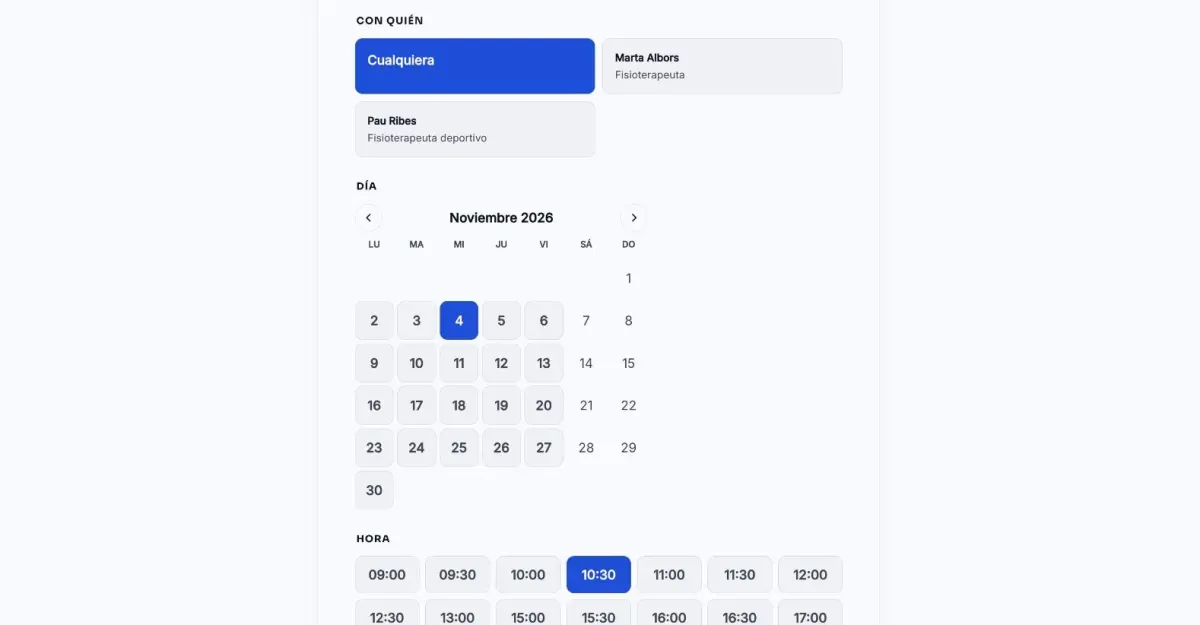
They choose the service, who with, the day and a free time. You see it all in your agenda, and Claude helps you run it.
Free during the 14-day trial · After that, €19 a month per website
Up and running in an afternoon
-
Turn them on
From Bookings, in the dashboard. They are free during the trial; with a plan they are added to your subscription.
-
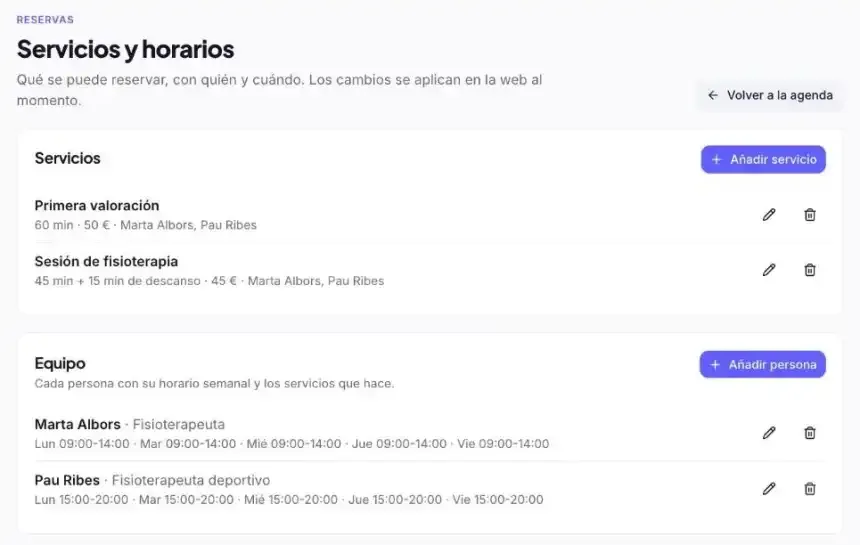
Add your services and your team
Length, price, who does each service and their weekly hours. Or ask Claude in one sentence.
-
Add the block to your website
The “Online booking” block on your contact page or wherever you like, with your design.
-
Get bookings
You get a notice of every booking and it is in your agenda. The person who booked gets the confirmation by email.
What a business that lives on appointments needs
Hairdressers, clinics, physios, academies, workshops... without sending anyone to another tool.
-
Service, person and time
They choose the service, who with (or whoever is free), the day and a free time. Two bookings are never given at the same time.
-
Your whole team
Each person with their weekly hours (morning and afternoon, if needed), the services they do and their holidays.
-
Closures and holidays
Bank holidays, holidays and days you close, for one person or the whole business.
-
Your rules
Minimum notice, how many days ahead, how often bookings start, a break between services and whether you confirm them yourself.
-
Confirmation and reminder
An email with the booking for their calendar and a link to cancel it, and a reminder before the appointment.
-
Every booking, a contact
Every booking is filed under its contact and counts in your statistics and A/B tests.
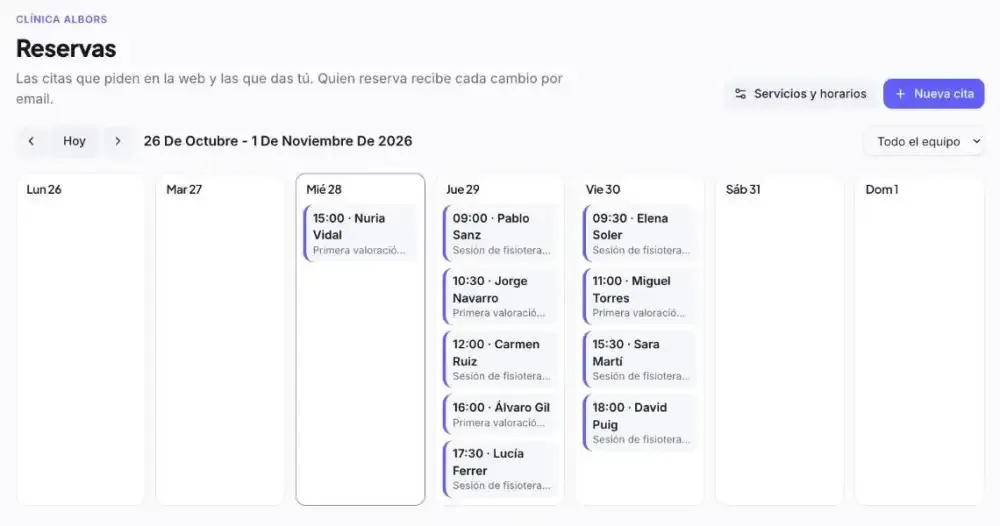
The whole week at a glance
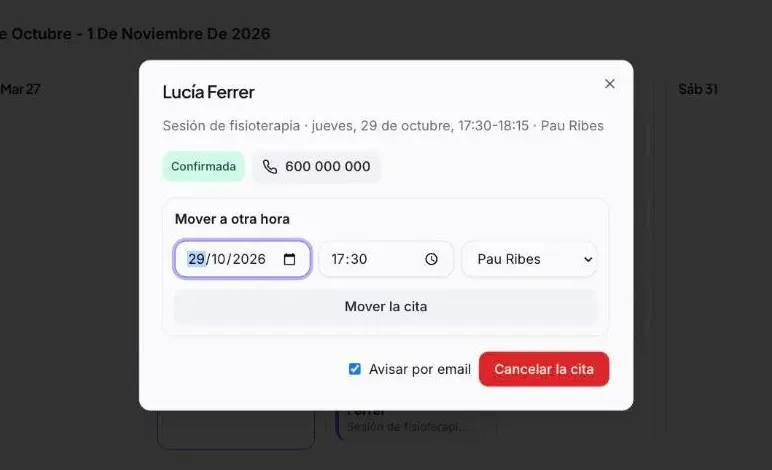
In Bookings you see the whole week, for the whole team or for one person. From each booking you confirm it, move it to another time or person, cancel it or mark that they did not come.
- Bookings people make by phone, added in a moment
- The person who booked gets an email with every change
- Your team sees the agenda with their own permissions
Run your agenda by talking
With the clixxii connector, Claude sets up your bookings, adds the appointments people make by phone and tells you who is coming.
Set up
Set up bookings: a 60-minute first assessment for €50 and a 45-minute physio session with a 15-minute break. Marta in the mornings and Pau in the afternoons, Monday to Friday.
Done (3/3)
- Created both services with their length and price
- Gave Marta 9:00 to 14:00 and Pau 15:00 to 20:00
- Checked that free times already show on the website
Done: people can now book from your contact page. Shall I close any bank holidays?
Phone booking
Lucía Ferrer is on the phone, 600 111 222: she wants a physio session on Thursday afternoon.
Done (3/3)
- Looked for free times on Thursday afternoon
- Booked 17:30 with Pau
- Added her phone number to the booking
Done: Lucía is booked for Thursday at 17:30 with Pau. If you give me her email, I'll send her the confirmation.
Day to day
Who is coming on Thursday afternoon?
Done (2/2)
- Read Thursday's agenda
- Picked out the afternoon bookings
Two bookings with Pau: Álvaro Gil at 16:00 (first assessment) and Lucía Ferrer at 17:30 (physio session).
Sort out doubts
Why are there no times on Saturday?
Done (2/2)
- Checked Saturday's hours
- Looked at closures and the team's holidays
Because nobody works on Saturdays: Marta and Pau work Monday to Friday. Shall I give Marta Saturdays from 9:00 to 14:00?
Frequently asked questions
How much do they cost?
They are an add-on not included in any plan: €19 a month per website, or €190 a year with a yearly plan, excluding VAT. If you turn them on mid-month, the prorated amount is charged on your next invoice.
Can I try them for free?
Yes. During the 14-day trial you use them free and without a card. If you then choose a plan, they stay on and are added to your subscription.
Can I have several people with different hours?
Yes. Each person has their weekly hours, the services they do and their holidays. Your customers choose who with, or “whoever is free”.
How does my customer cancel a booking?
With the link in the confirmation email. The time is freed at once and you get a notice.
Can I add bookings people make by phone?
Yes, from your agenda in the dashboard or by asking Claude. If you give the person's email, they get the confirmation as if they had booked on the website.
Do they connect with Google Calendar?
Not yet; we are working on it. Meanwhile, every confirmation includes the event to add it to any calendar.
Can I turn them off?
Whenever you want, from Bookings in the dashboard. They are removed from your subscription and the block stops showing on your website.
Let your customers book on your website
Build your website and try bookings free for 14 days, no card needed.