
Table bookings on your website, with no commission
Your guests choose how many they are, the day and a time with room, based on your shifts and seats. You see the day in the panel, take a deposit if you want, and nobody takes a cut of every guest.
Free during the 14-day trial · Then €19 a month per website · No fee per guest
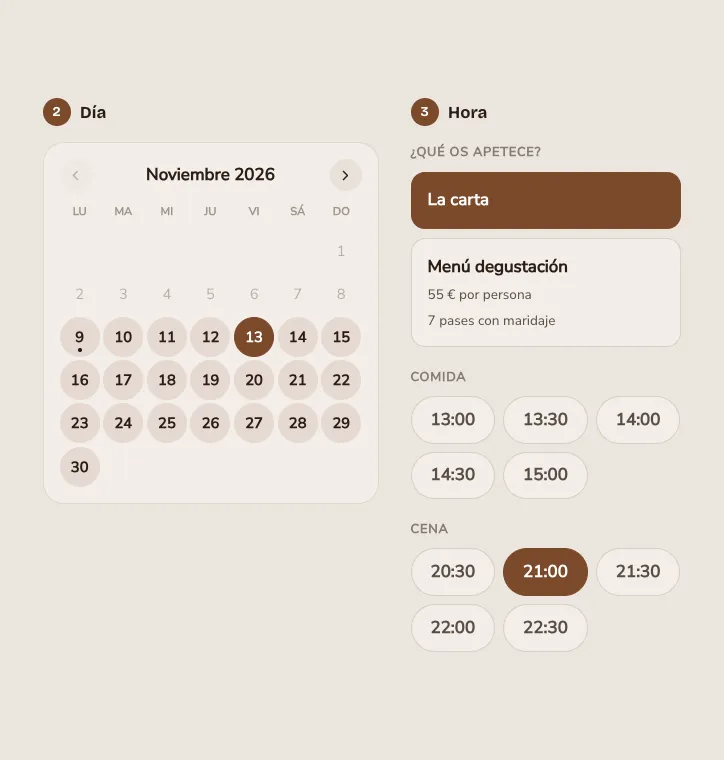
Up and running in an afternoon
-
Turn them on
From Table bookings in the panel. Free in the trial; with a plan it is added to your subscription.
-
Set your shifts and seats
Lunch and dinner each day: arrival times, seats at once and how long a table lasts. Or ask Claude in one sentence.
-
Add the block to your website
The “Table booking” block on your home page or contact page, with your design.
-
Fill your tables
You get a notice of every booking and see it in the day view. Guests get the confirmation and a reminder.
What a restaurant needs, without another platform
On your domain, with your design, and without sending your guests to a marketplace next to your competitors.
-
Real capacity
It counts everyone seated during each table, not only those arriving at the same time. You never book more than fits.
-
Shifts and arrivals
Lunch and dinner with their arrival times, and a limit of arrivals per slot so the kitchen is not swamped.
-
Zones
Dining room, terrace or bar, each with its seats. Guests choose where, or “No preference”.
-
Length by party size
A couple keeps a table less time than a party of six: each size, its own length.
-
Waiting list
Full times can be waited for. If someone cancels or leaves early, we email them in order and the first to confirm gets the table.
-
Goodbye no-shows
A deposit per person when booking, to your Stripe or bank. Refunded if they cancel in time; if they do not come, you keep it.
-
They confirm they are coming
The reminder asks “Can we count on you?”: they confirm in one click or cancel, and the table is free again.
-
Prepaid experiences
Tasting menus, Valentine’s dinners or tastings, paid when booking. If you want, those days only the experience can be booked.
-
Guest profile
When you seat them you already know how many times they came, their allergies, whether they celebrate something and your notes.
-
Walk-ins
Walk-ins take their table in one tap and count towards your seats like everyone else.
-
Groups and phone
Large parties can wait for you to confirm them. And phone bookings are noted in a moment.
-
Live in the dining room
Seat each table when it arrives and mark it free when they leave: its seats can be booked again at once.
The whole service at a glance
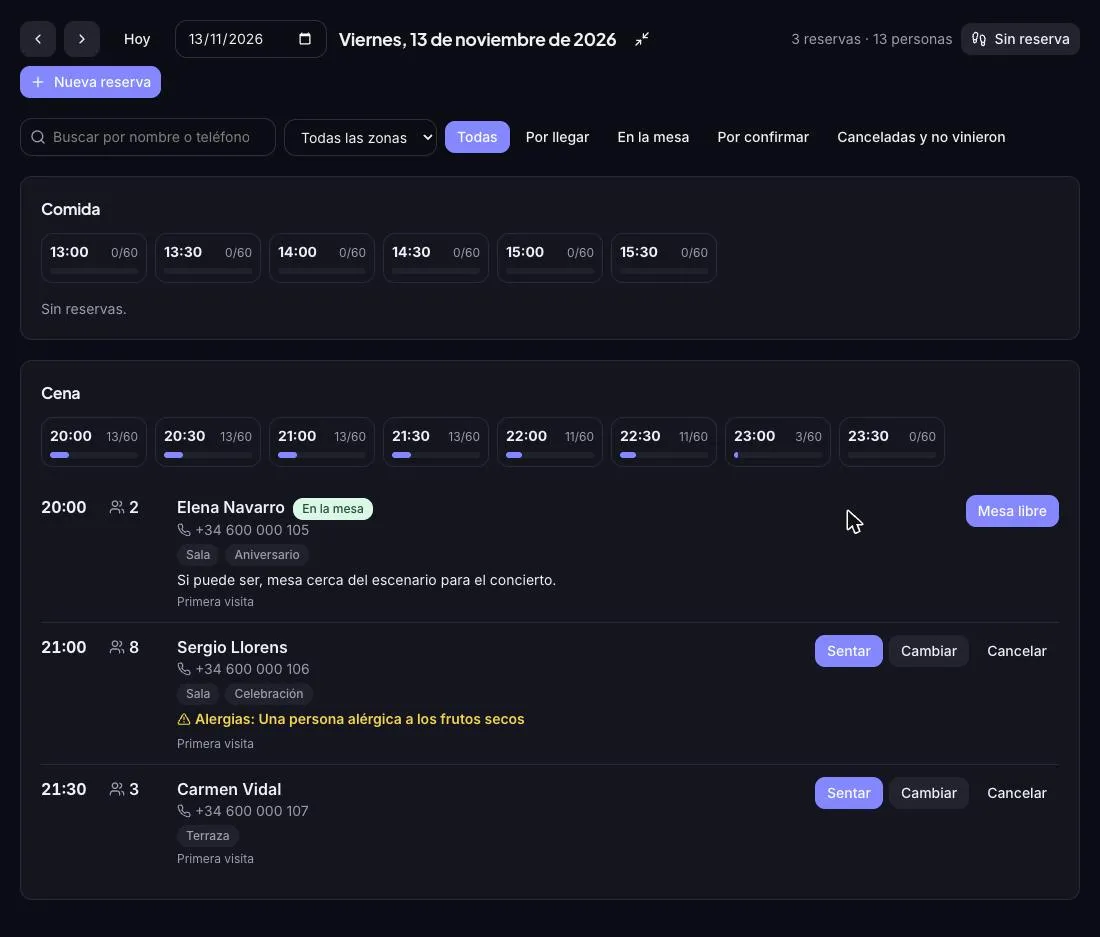
The day view shows each shift with how full each time is, and below it the bookings: how many, the zone, the occasion and allergies highlighted. During the service, put it full screen, seat each table when it arrives and mark it free when they leave: its seats are available again at once and, if someone is waiting for that time, they are offered them.
- Full screen for the service, with lunch and dinner in view
- Tap a time to see only who arrives then; or filter by name, zone or status
- Seat and “table free”: capacity that matches the dining room
- Walk-ins seated in one tap
- First visit or regular, with their allergies and your notes
So they come back
-
Survey and reviews
Two hours after the visit, an email asks how it went. Low ratings reach you at once so you can put it right; happy guests are invited to leave a Google review.
-
Reports
Covers by day and shift, no-shows, returning guests, money taken in deposits and the average rating.
-
Run it by talking to Claude
With the connector, Claude sets up your shifts, tells you who is coming tonight with allergies, books tables by phone and sums up your month.
Bookings with no fee per guest
Booking platforms are convenient, but many charge for every person who sits down or show your restaurant next to your competitors. With clixxii table bookings, guests book on your own website and you pay a fixed monthly fee, whether you fill the room once or twenty times.
They work inside your restaurant’s website, next to your menu with allergens marked and your Google profile. Do you host concerts or tastings with tickets? See also events and tickets, and every plan in pricing.
Frequently asked questions
How much does it cost?
It is an add-on not included in any plan: €19 a month per website, or €190 a year with a yearly plan, VAT not included. No fee per guest or per booking.
Can I try them for free?
Yes. During the 14-day trial you use them free, no card needed. If you then choose a plan, they stay on and are added to your subscription.
Is it the same as online appointment bookings?
No. Appointments with a service and a person (hairdressers, clinics) are Online bookings. Table bookings are for restaurants: people, shifts and seats.
How is the deposit charged?
Deposits and experiences are charged to your Stripe account or your bank’s Redsys POS: the money goes straight to you, with Stripe’s or your bank’s usual fees. If you do not want a deposit, you do not need to connect anything.
What if a guest cannot come?
The reminder asks whether they are coming: they confirm in one click or cancel. The table is freed at once, you get a notice and, if someone is on the waiting list, we offer them the place.
What about large parties?
You choose the largest party that can book on the website. Above it, the website asks them to call you. And large parties can wait for your confirmation.
Does it assign specific tables?
Not yet: capacity is by seats and zones, and you assign the table in the dining room. The table plan is on its way.
Can I turn them off?
Whenever you want, from Table bookings in the panel. It is removed from your subscription and the block stops showing. Your shifts and bookings are kept.
Fill your tables from your website
Create your restaurant’s website and try table bookings free for 14 days, no card needed.