
Quotes your customers accept on your website
Write the quote in the dashboard, from a message of your form or by asking Claude. Your customer gets it by email with its PDF, accepts it with their name and, if you ask, pays the deposit right away.
Free during the 14-day trial · Then €12 a month per website
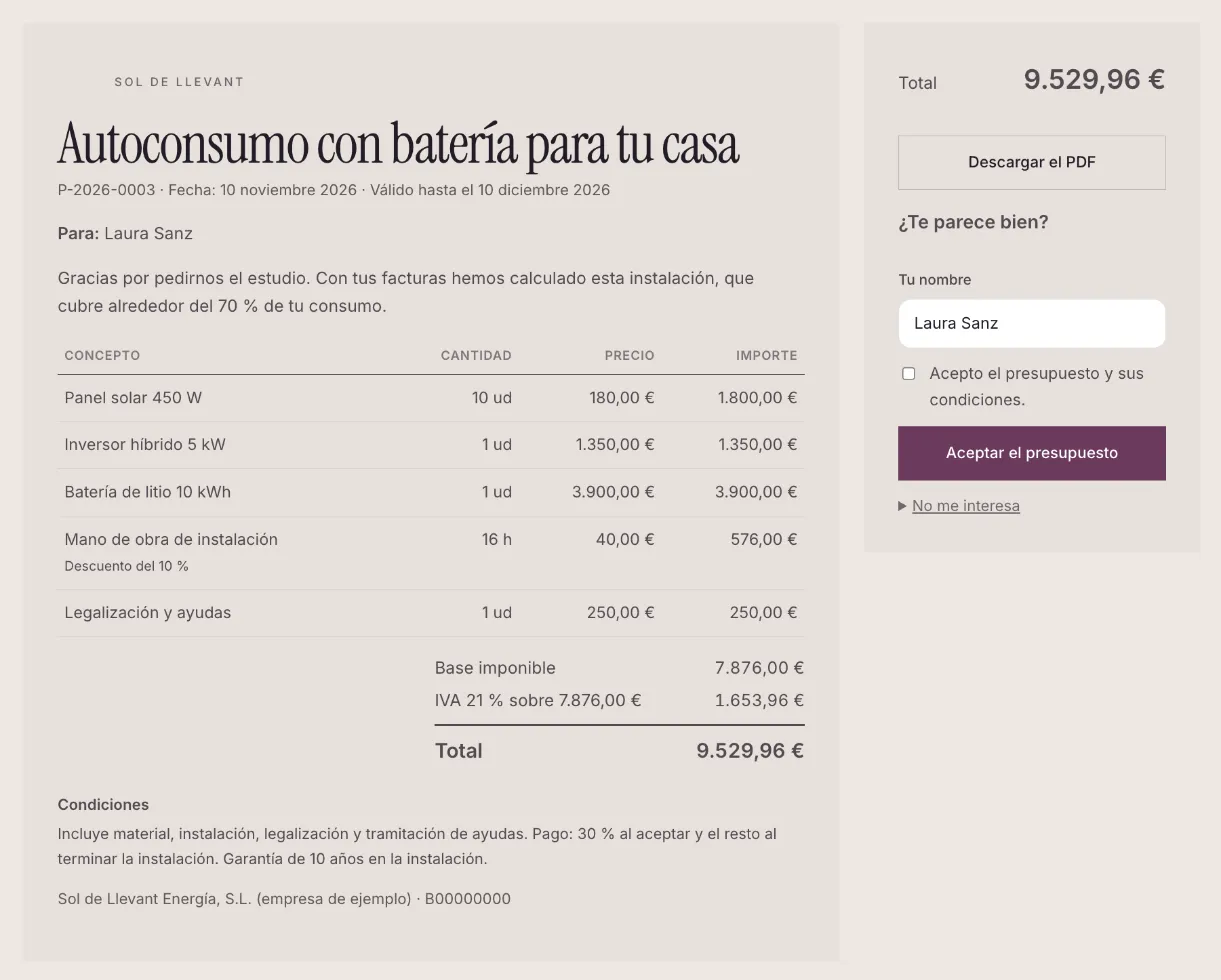
From the message to the “yes” without leaving your website
-
They ask for a quote
Through your website form, by phone or in person. From the message, one click on “Make a quote” and you have a draft with the customer's details.
-
You write it in minutes
Lines with quantity, price, VAT and discount, or what you often quote taken from your catalogue. The totals add up by themselves.
-
You send it with its PDF
Your customer gets an email with the PDF, with your logo and tax details, and a button to see it on your website.
-
They say yes
They accept it by typing their name, or turn it down saying why. You hear about it at once and the contact becomes a customer.
Everything a quote needs
On your domain and with your design, without sending your customers to another app.
-
Lines, VAT and discounts
Quantity, unit, price, VAT per line and discount. VAT is broken down by rate and, for freelancers, the income tax withholding is applied.
-
Your catalogue
Keep what you often quote, like “Labour (h)” or “450 W panel”, with its price and VAT, and add it in one click.
-
A PDF with your brand
With your logo, your tax details, the lines, the VAT breakdown, the total and your terms. Attached to the email and downloadable from the website.
-
Online acceptance
Your customer accepts by typing their name and ticking that they agree, or turns it down telling you why. The date of every step is kept.
-
Deposit on acceptance
Ask for a percentage or a fixed amount and your customer pays it when accepting, with your Stripe or your bank's Redsys terminal. The money goes straight to you.
-
You know where it stands
We let you know when it is first opened, when it is accepted and when it is turned down. And it expires by itself on its date.
-
Numbered and unchanged
Every quote sent gets its number (P-2026-0001) and no longer changes. To correct it, you make a new version that replaces the old one.
-
Every quote, in its contact
When you send it, the customer joins your contacts with the quote in their history. When they accept, they move to the “customer” stage.
-
Run it by talking to Claude
With the connector, Claude writes the quote from a message, leaves it as a draft and sends it once you give the go-ahead.
All your quotes at a glance
In Quotes you see what you sent, what was accepted and your acceptance rate. Filter by status, search by number or customer, mark as accepted the one confirmed by phone and export the list whenever you need it.
- Drafts, sent, accepted, turned down and expired
- A preview of the PDF before sending it
- An automatic reminder to those who have not answered yet
Quotes without Word, without Excel and without another app
Many builders, installers, workshops and consultants get the request through their website, then write the quote in Word, turn it into a PDF and email it without knowing whether the customer opened it. With clixxii quotes everything happens on your own website: the request reaches your inbox, the quote goes out with your brand and your customer accepts it with one click. You pay a fixed monthly fee, whether you send one quote or a hundred.
They work with the multi-step forms and contacts of your website, and with automations, which can remind those who have not answered. And if you prefer to work by talking, see how to edit and run your website with Claude. Want to see it on a real website? Sol de Llevant, one of our example websites, takes quote requests from its home page.
Frequently asked questions
How much does it cost?
It is an add-on not included in any plan: €12 a month per website, or €120 a year with a yearly plan, VAT not included. No limit on quotes.
Can I try it for free?
Yes. During the 14-day trial you use it for free and without a card. If you then choose a plan, it stays on and is added to your subscription.
Does it make invoices?
No. It makes quotes and takes the deposit, but it does not issue invoices. You keep invoicing with your usual software.
What do I need to send the first one?
Your legal or business name and your tax ID, which appear on the PDF. Optionally, your tax address, the default VAT and validity, and your terms.
How is the deposit paid?
With your Stripe account (card, Apple Pay and Google Pay) or your bank's Redsys terminal, which may include Bizum. If the customer accepts but does not finish paying, the deposit stays pending.
Can I change a quote already sent?
It does not change, so what your customer accepted is always the same. You make a new version, which replaces the previous one and is sent again.
In which languages?
In the language you choose for each quote: the email, the PDF and the page to accept it are available in English, Spanish, Catalan, Dutch, French, German, Italian, Portuguese and Russian.
Send your first quote today
Create your business website and try quotes free for 14 days, no card needed.