
What's new: contacts with their history, automations and Google reviews
Everyone who writes to you or books now has one card with their whole history and tags. And clixxii takes the next step for you with simple automations and asks for Google reviews after each booking.
Until now, the messages from your forms and the bookings in your agenda lived apart. If someone wrote to ask a question and then booked, you had to connect the dots yourself. Not any more: each person has one card, with everything they wrote to you and all their bookings, and clixxii can take care of the steps you repeat every day.
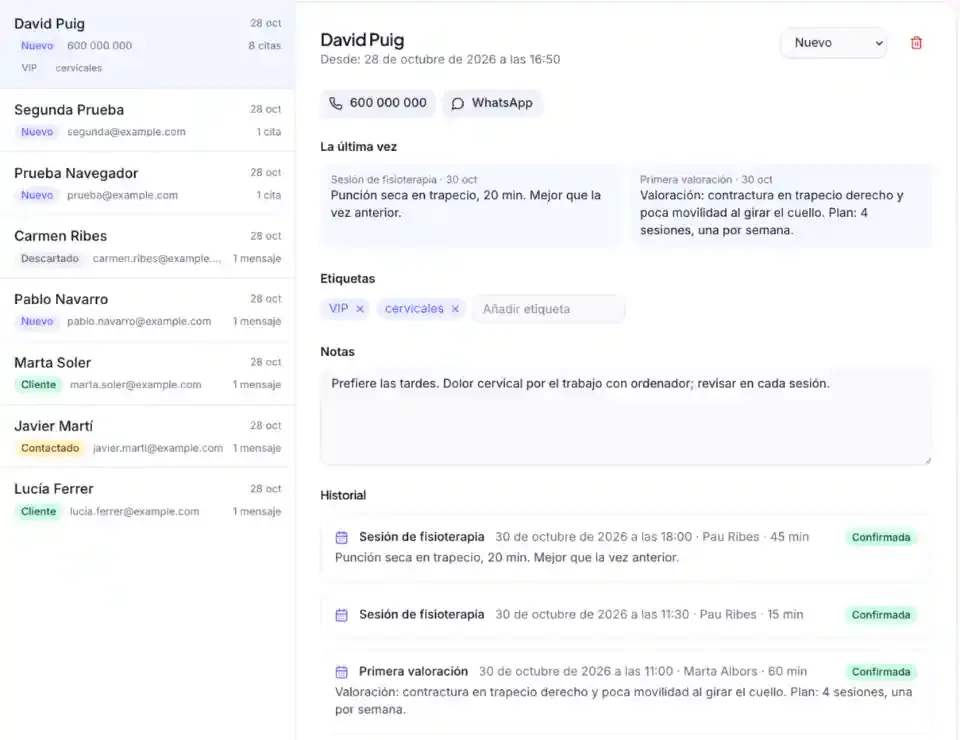
One card per customer, with their whole history
In Contacts, each person's card brings together their messages and bookings in one timeline: the service, who with, how long it took and whether they came. From each booking you jump to that week of the agenda.
- Free tags (“VIP”, “colour”, “grants 2026”) to find people later. Filter the list by tag, search by it and download it as a CSV that opens in Excel.
- Last time: what was done in each service, so you have it in front of you at the next visit.
- The stage (new, contacted, customer or lost) and your notes, as always.
Automations: when this happens, do that
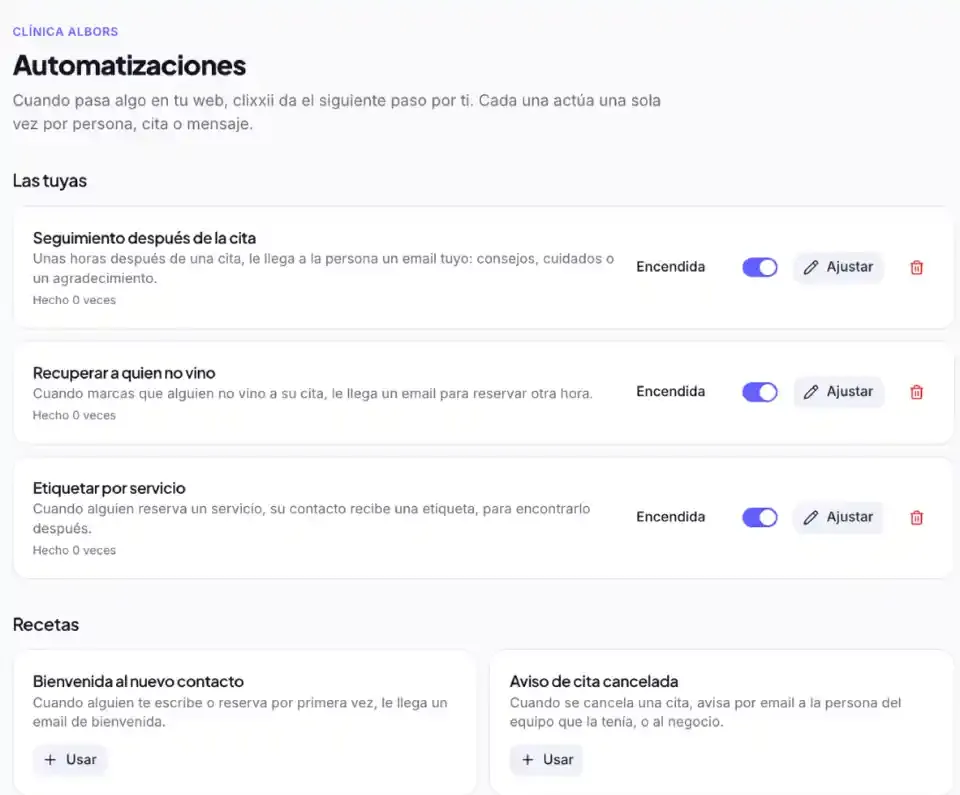
Many tasks repeat themselves: welcoming whoever writes, telling the team when someone cancels, writing to people who did not come. In Automations you pick a recipe, adjust the text in your own words and turn it on. No diagrams to draw: they are ready-made recipes.
- Welcome the new contact, for whoever writes or books for the first time.
- Cancelled booking notice to the team member who had it, or to the business.
- Win back no-shows, with an email to book another time.
- Follow-up after the booking: advice or aftercare for a specific service, a few hours later.
- Move to customer whoever comes to their booking, and tag by service whoever books.
- Reminders for you: a message still unanswered or a booking waiting for your confirmation.
Each automation acts only once per person, booking or message, checks it is still needed before acting and never writes about bookings from past days. And to keep your emails out of spam, there is a daily sending limit.
Google reviews after every booking
Reviews are what weighs most when someone looks you up on Google, and the best way to get them is to ask at the right moment. In Settings → Reviews you paste the link of your Google Business Profile and clixxii sends a friendly email a few hours after each booking, with a button straight to the review.
- Only to people who came, never to no-shows, and only once per person.
- In their language and in your business's name.
- And from any contact's card, a button to ask by hand those who buy without booking.
With Claude too
With the clixxii connector, Claude finds your customers, sums up their history, tags them or changes their stage, and turns automations on with texts written in your tone: “when someone books physio for the first time, send them this advice”. It always shows you the text before turning it on. See how to edit your website with Claude.
Getting started
It is all in your dashboard already: Contacts, Automations and Settings → Reviews. If you take bookings, have a look at clixxii's online bookings and what's new in the agenda: notes for every booking, a role just for reception and Bizum payments.
Try it with your business
Create your website with AI and try it free for 14 days, no card needed.