
What's new in the agenda: notes for every booking, a reception role and Bizum payments
Note what you did for each customer and have it in front of you at their next booking, hand the agenda to reception without access to the website, and take deposits with Bizum, Redsys, PayPal or SumUp.
In a hair salon, a clinic or a beauty centre, what customers value most is that you remember them: the colour you used, how the last session went, what you recommended. These updates to clixxii's online bookings are about exactly that, and about making the day-to-day agenda easier for the whole team.
Work notes in every booking
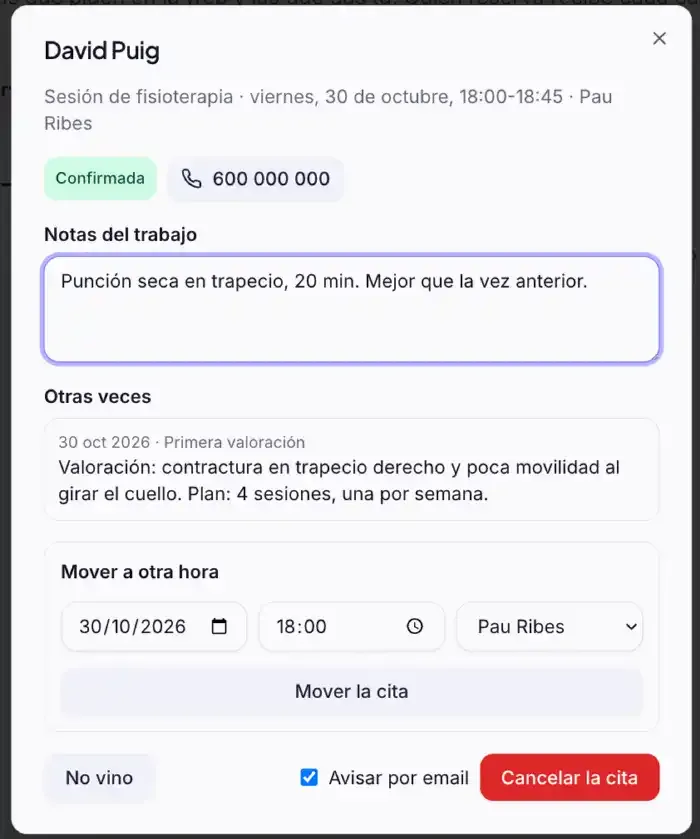
When you open a booking in the agenda there is a new field, Work notes, to write down what you did: “colour 6.3, 35 minutes”, “dry needling in the trapezius”, “balayage highlights”. Only your team sees it, it is stored encrypted and the customer gets no notice.
Right below it, Previous times shows the notes from their earlier bookings. So before you start, you know what was done last time without asking or looking through a notebook.
At the top of the contact's card you see Last time: the latest note for each service, for example “Colour · 28 Oct: 6.3”. And in their history, every booking with its note. There is more about it in what's new in contacts, automations and reviews.
A role just for the agenda
Reception, or whoever answers the phone, needs the agenda but should not touch the website or read the messages. That is what the new Agenda role is for: they land straight on Bookings and can give, move and cancel bookings, mark no-shows and write work notes. Nothing else: no pages, no messages, no settings. You choose it when you invite someone from Team.
Payments with Bizum, Redsys, PayPal and SumUp
The payments block is no longer Stripe only. Each payment, a deposit, a voucher or a product, can be:
- A payment link from Stripe, PayPal, SumUp or Redsys, your bank's virtual POS, which takes cards and Bizum too if your bank has it switched on.
- Bizum to your number: the website shows your mobile or merchant code, the amount and the reference, with a button to copy the number.
The money always goes straight to your account, and your statistics show how many people go to pay.
With Claude too
With the clixxii connector, Claude reads and writes work notes: “note that Ana got 6.3” or “what did we do for Ana last time?”. And after each booking, if you like, an automation sends the customer their aftercare and another asks for a Google review.
All this adds to what you already had: online bookings on your own website, with your team, your hours and email reminders. See every feature in Features.
Let your customers book on your website
Create your website and try bookings free for 14 days, no card needed.